

The Generated Patient Summary (GPS)
The Generated Patient Summary (GPS) is an AI-backed summary of available data in the ZAP.
Generated Patient Summary (GPS)
The Generated Patient Summary (GPS) accelerates decision-making by distilling the most critical patient information into a clear, concise summary. Synthesizing Zus data into several consolidated sections, GPS summarizes key information about the patient, and always includes a citation back to the source of that information.
Whether you're prepping charts before clinic, triaging a panel, or seeing a patient for the first time, GPS gives you the key context in seconds.
When to use GPS
The GPS helps you understand at-a-glance what's most important about your patients. It is most useful to help Get Up To Speed on a patient - so you can understand information about a patient's history and dive deeper into the information that is most critical to your care.
What information GPS highlights
The GPS is split into sections to make navigating easier. The default sections are as follows:
- Patient demographics — Confirm identity, insurance, and contact info is current before the visit
- Vital signs — Review recent vitals to quickly orient to a patient's baseline health status
- Current medications — See what's actively prescribed across all sources in the record
- Active clinical concerns — Surface the conditions and issues most relevant to the current care context
- Recent hospitalizations and visits — Know if your patient was recently admitted, discharged, or had an ED visit
- Latest labs— Spot abnormal or trending values without manually searching the record
- Latest history and physical— Get oriented to a patient's baseline, especially for new patient visits or cross-coverage
- Social history and determinants of health — Understand housing, food security, transportation, and other factors affecting care
- Latest pathology — Flag recent biopsy or pathology results that may be driving or changing a care plan
- Affordability and accessibility challenges — Surface financial or access barriers that may affect follow-through on care plans
How to use GPS
Generating a summary is available as a button on the overview page. You can click the button and summarization generation will begin. While the summary is generating you can navigate away from the overview and browse the rest of that Patient's ZAP. A notification will appear when the summary is ready to be viewed.
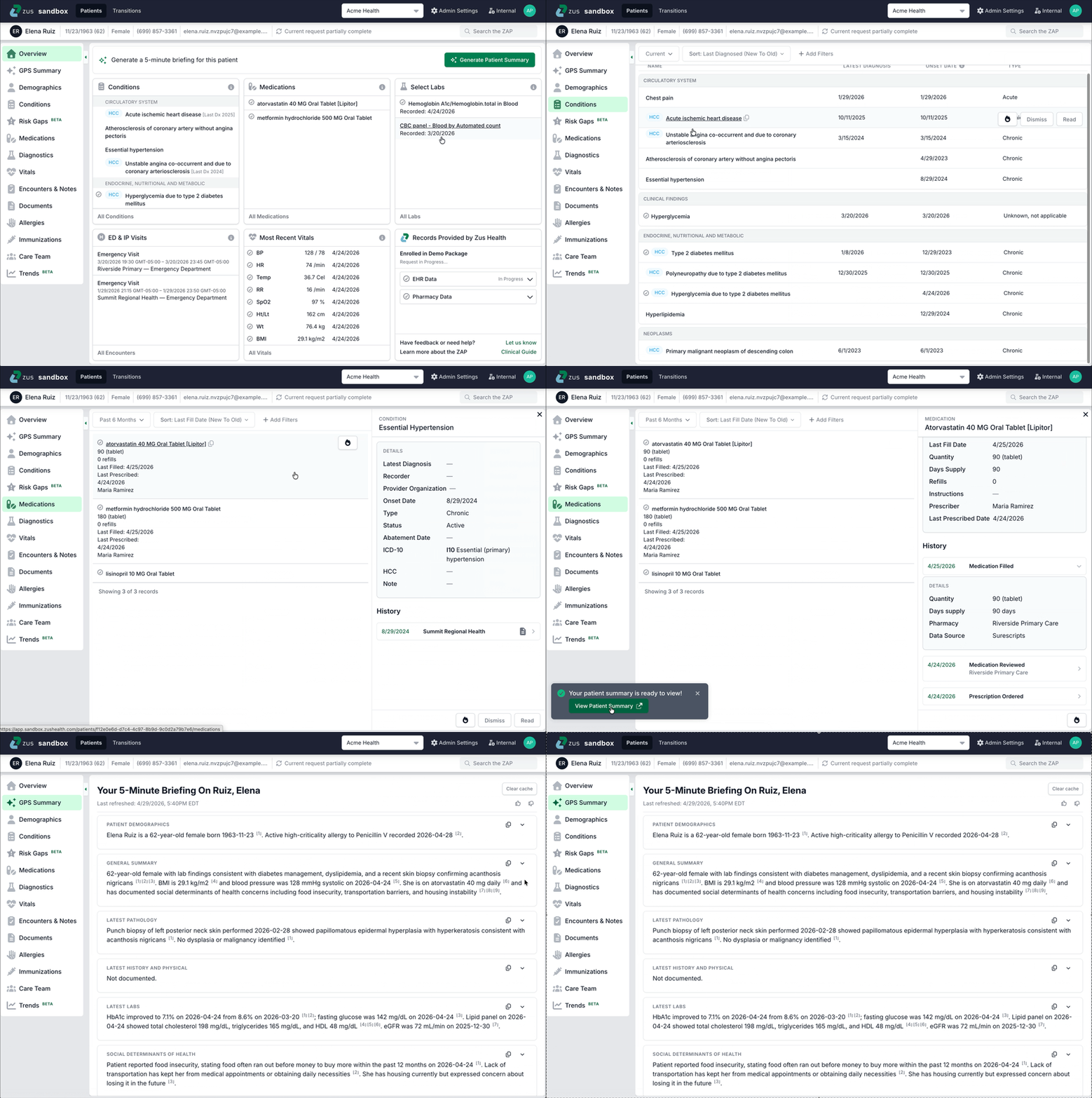
- If you navigate away from the patient ZAP, you will not see the pop-up notification, but can navigate to the GPS page to watch the summary stream onto the page.
- Each section of the summary is collapsible and has a "copy" button
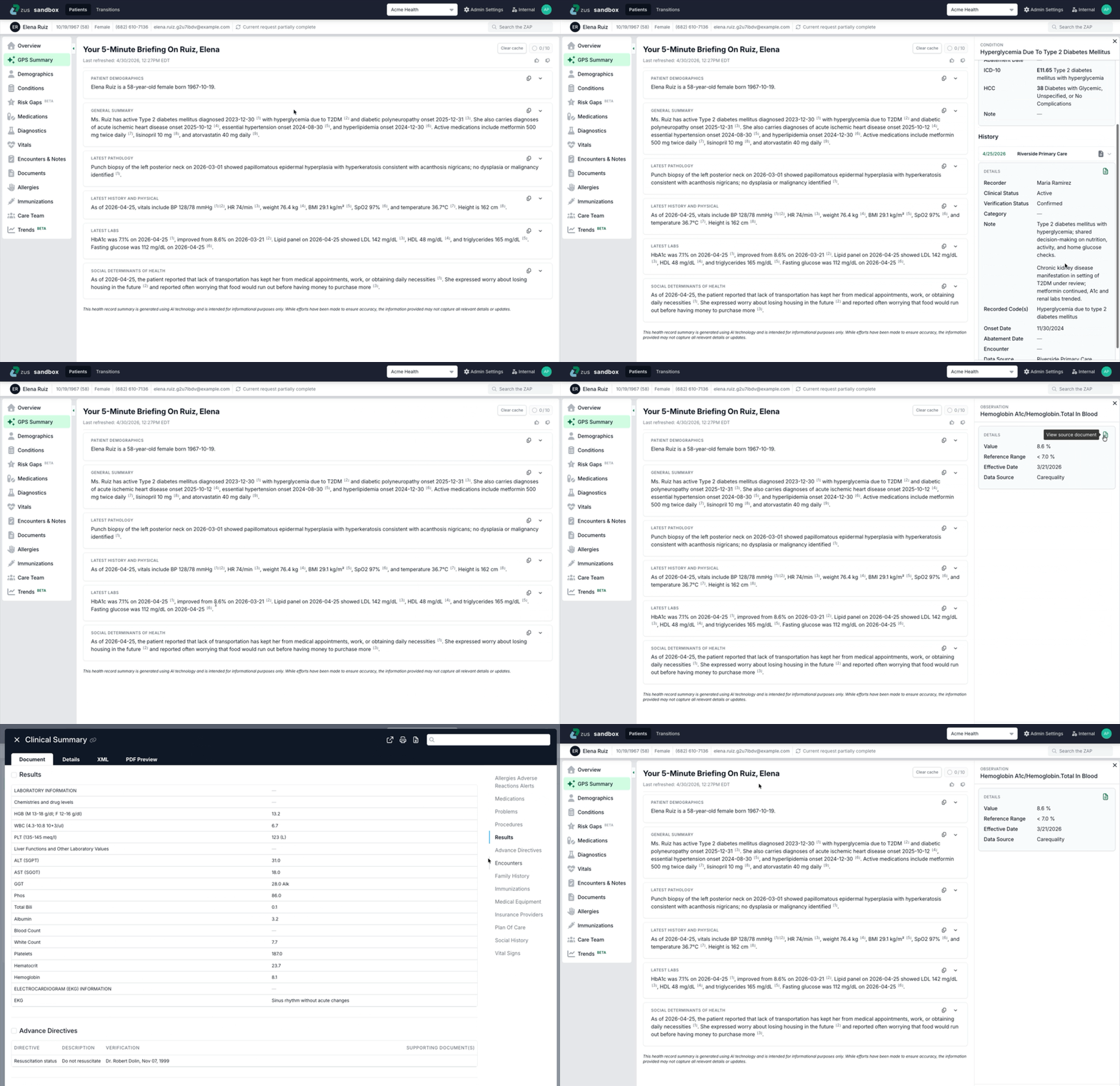
- Citations open either in a side drawer or open the full document
Citations
Every clinical statement in the summary includes a citation. Citations are numbered in each section.
- Citations may open evidence in a drawer or directly open a document
- The drawer is the same one that would open in other sections of the ZAP, and includes relevant clinical context for the data
Access and availability
GPS is available as an add-on to Zus packages, and included in some packages. Talk to your Account Executive for more information. Users without GPS in their packages get access to 10 free summaries monthly. You can track your monthly usage at the top of the ZAP, where there is a banner indication of how many summaries are available, how many are used, and more.

Frequently asked questions
How can I enable GPS?
- Every Zus user gets access to 10 free summaries per month.
- For unlimited summaries, reach out to your Zus Account Executive for more information.
What data is included in the GPS?
The following data types are evaluated and included in the summary:
- Structured data: Conditions, Medications, Allergies, Immunizations, Labs, Social and Family history, Diagnostic tests, Vitals
- Unstructured data from: Visit Notes, Encounter Summaries, and Longitudinal Continuity of Care documents.
Is the summary content always the same?
No. If new data comes in for a patient or it's been more than fifteen days since a summary was generated, we will likely generate a new summary the next time that GPS button is clicked.
If you look at a patient summary twice in the same day or week, we retain that summary and it will be the same for all viewers.
How accurate is the AI-generated summary?
GPS is designed to surface things that are present in the record rather than miss them. It draws from both structured data (conditions, medications, labs) and unstructured notes, which means it can catch clinically relevant information that wouldn't appear in a problem list alone.
Every statement in the summary is cited back to the source data so you can verify it in one click. If something looks unexpected, the citation is your fastest path to context. GPS does not interpret findings, make diagnoses, or recommend treatments. Think of it as a well-organized briefing prepared by someone who read the whole chart so you don't have to.
What safeguards are in place to ensure that important details are not missed?
- Every clinical claim is cited. Each piece of summarized information links directly to its source document. If something looks unexpected or inconsistent with what you know about the patient, click the citation to review the underlying record.
- GPS is purely a summary. It does not generate clinical recommendations, suggest diagnoses, or draw conclusions beyond what is present in the source data. Clinical judgment is always yours.
- Data quality affects summary quality. If a patient's records are sparse, incomplete, or haven't yet synced, the summary will reflect that. GPS can only work with what's in the record.
- Conflicting information across sources is not automatically resolved. If the same medication or condition appears differently across documents, GPS may not flag the discrepancy. Use citations to trace any item back to its source and reconcile as needed.
- Summaries are continuously reviewed by clinical staff. Coders, nurses, and physicians regularly review GPS output against source records as part of ongoing quality monitoring.
Updated 18 days ago